E2BSpritesDedalusVercel
Launch

Provision Agentson any Substrate.

Pick runtime, provider, and model from one account. Provision persistent workers with loadout, state, console, logs, usage, cron, and artifacts.

Agents
Model paths
BYOK upstreams
Install catalog
1,400+ entries
Browser terminal
live PTY
Tools & MCPs
auto-wired
Crons
scheduled
Guided deploy
phase-tracked
Substrates
Owned memory
portable
Persistent state
survives sleep
Credential gate
fail closed
Benchmarked lanes
boot · shell · IO
Provider snapshots
where supported
Four providers
one interface
Use any toolmodel routers · registry catalog · MCPs · CLIs
Switch
Automate
Code
Data
Observe
Browse
Render
Sell

ACTIVITY -- 6 MONTHS

149 active days

tap a cell . click a chip to filter

DEC
JAN
FEB
MAR
APR
MAY
JUN

filter by agent . 6

lessmore

filter by service . 23

SDK

Create the worker in code.

Create a persistent worker with one typed recipe. Choose the agent, substrate, model, and state policy. The control plane handles boot, gateway, logs, and usage.

agent
Hermes
substrate
E2B
model
Opus 4.8
state
Persistent
01typed client
02agent + substrate
03server-normalized model
04observable run
agent-machines.ts
recipe -> worker
01import { AgentMachines } from "agent-machines"0203const am = new AgentMachines()0405const agent = await am.create({06agent: "hermes",07sandbox: "e2b",08model: "claude-opus-4.8",09persistent: true,10})1112await agent.run("review my code")
auth
bearer
boot
phased
logs
attached
package
install
recipe
compose
model
normalize
state
persist
run
run
proof
observe
01

Import the client

Use the SDK from any server.

npm i agent-machines
02

Shape the worker

Pick runtime, substrate, and model.

am.create({ agent, sandbox, model })
03

Keep the worker

Persist files, skills, and memory.

persistent: true
04

Run real work

Send the prompt when ready.

await agent.run(prompt)

WORKFLOW

One worker, one recipe.

Account settings compile into a runnable worker: runtime, substrate, model path, environment, loadout, and observable state.

runtime
agent driver
substrate
machine lane
loadout
tools + MCP
observe
logs + usage

AGENT MACHINES · CONTROL PLANE

stage 01

Configure once, supervise the whole fleet.

Setup, lifecycle, terminal, logs, artifacts, usage, and chat all read from the same account objects. The dashboard shows what is configured, running, and saved.

  • 01Pair runtime + substrate from one account settings model
  • 02Worker lifecycle: wake · sleep · destroy (per substrate capability)
  • 03Persistent state in /home/machine/.agent-machines
Backed byClerkVercel
stage 01
recipe
runtime + substrate
state
disk-backed
actions
wake · sleep · destroy
worker recipedashboard
reciperuntime + substrateaccount object
statedisk-backed/home/machine
actionswake · sleep · destroycapability gated
$am fleet inspect
Fleet: kevin-fleet
Workers: 3 active
Workercode-review-01
Statusawake
Runtimehermes (autonomous)
Substratee2b (sandbox)
Last wake12m ago
Settingsruntime + substrate + profiles
Actionswake · sleep · destroy
Storage/home/machine/.agent-machines
✓ Fleet healthy

AGENT MACHINES · RUNTIME LANES

stage 02

Four runtimes, two operation models, one worker.

Hermes and OpenClaw run as longer-lived agent drivers. Claude Code and Codex run as task CLIs. Each lands inside the same machine record and persistent runtime root.

  • 01Always-on agents: Hermes · OpenClaw
  • 02Task CLIs: Claude Code · Codex
  • 03Reusable per-account agent profiles
Backed byNousOpenClaw
stage 02
autonomous
Hermes · OpenClaw
task cli
Claude Code · Codex
profile
per account
worker recipeagent
autonomousHermes · OpenClawgateway workers
task cliClaude Code · Codexheadless commands
profileper accountsaved default
$am runtime list
4 runtimes configured
NameModeDriver
Hermesautonomousmemory + cron + MCP
OpenClawautonomousbrowser + vision
Claude Codetask-drivencoding + SDK
Codex CLItask-drivensandbox + command
✓ Runtime lanes ready

AGENT MACHINES · LOADOUT

stage 03

Skills, MCP servers, CLIs, and plugins — one harness.

Loadout is the active stack on a machine: skills, MCPs, service lanes, CLIs, plugins, and source entries. Registry is where new entries get added.

  • 01161 skills in SKILL.md protocol
  • 0227 service lanes · MCP → CLI → skills
  • 0324+ CLIs · closed-loop verification
  • 04Custom loadout: skill · tool · mcp · cli · plugin
Backed byAgent Machines
stage 03
skills
161
services
27
tools
23
worker recipetools + mcps
skills161SKILL.md
services27ranked lanes
tools23callable
$am loadout show
Loadout: opinionated-default
Built-ins23 tools
Skills161 synced
MCP servers39 catalog entries
Services27 lanes
Categories: frontend · security · research · design · ops · content · ...
✓ All integrations healthy

AGENT MACHINES · SUBSTRATE LANES

stage 04

Four substrate lanes — E2B, Sprites, Dedalus, and Vercel.

Each lane implements the same MachineProvider shape. The UI shows only the lifecycle actions and streaming behavior that provider supports.

  • 01E2B — sandbox with pause/resume
  • 02Sprites — persistent microVM on Sprites.dev
  • 03Dedalus Machines — strong default on boot and sleep/wake
  • 04Vercel Sandbox — persistent microVMs with auto-snapshots
Backed byVercel
stage 04
lanes
4
capability
provider-scoped
stream
terminal + logs
worker recipeproviders
lanes4one interface
capabilityprovider-scopedno fake buttons
streamterminal + logswhen supported
$am substrate list
4 substrate lanes configured
LaneTypeStatus
e2bsandbox● active
spritespersistent○ standby
dedaluspersistent○ standby
vercelpersistent○ standby
Filesystem:
~/.agent-machines/ runtime state
skills/ 161 SKILL.md files
sessions.db FTS5 history
✓ 1 lane active

AGENT MACHINES · ENVIRONMENT

stage 05

Gateway and env profiles follow every new worker.

Gateway modes, named variable sets, and bootstrap presets are account-level objects a new worker inherits on deploy.

  • 01Gateway modes: tunnel · ai gateway · byo
  • 02Named variable sets with env profiles
  • 03Phase-tracked bootstrap presets
Backed byVercelCloudflare
stage 05
gateway
ai gateway
env
profiles
bootstrap
phased
worker recipeenvironment
gatewayai gatewaydefault path
envprofilesnamed sets
bootstrapphasedvisible steps
$am env show
Gateway: ai gateway (default)
Bootstrap: phase-tracked
ProfileStatusDescription
Opinionated default● activebundled skills + tools
Frontend design labreadytaste + Figma + browser
Production opsreadyVercel + Datadog + CI/CD
Research browserreadysearch + extraction + reach
✓ 4 presets available

AGENT SURFACES

Every agent gets a full worker UI.

Each agent lands in the same worker frame: command surface, loadout, observable state, and saved runtime lanes.

chat + terminal
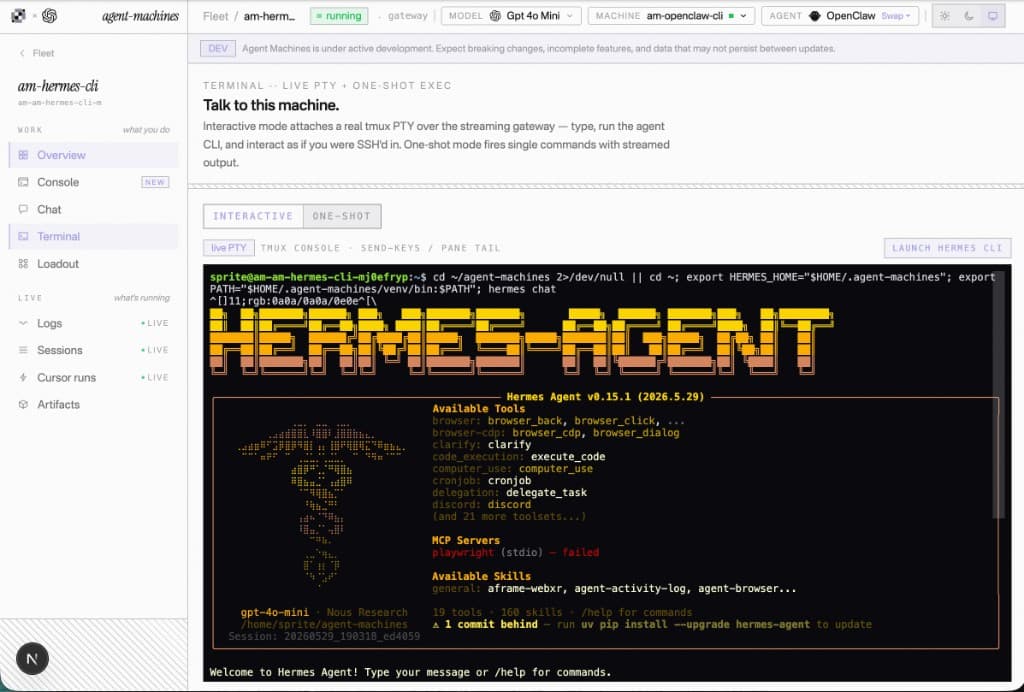
Hermes
hermes — terminal/home/machine
    ╭─────────────────╮
    │  ◈  H E R M E S  │
    │     ╱╲    ╱╲      │
    │    ╱  ╲──╱  ╲     │
    │   ╱    ╲╱    ╲    │
    │   ╲    ╱╲    ╱    │
    │    ╲──╱  ╲──╱     │
    │     nous research  │
    ╰─────────────────╯
Hermes
autonomous

Self-improving agent with persistent memory, cron scheduling, session history, MCP host, subagents, and FTS5 search. Works with any OpenAI-compatible endpoint -- 30+ providers out of the box.

installcurl -fsSL https://raw.githubusercontent.com/NousResearch/hermes-agent/main/scripts/install.sh | bash
interactivehermes
headless / commandhermes gateway
docshttps://hermes-agent.nousresearch.com/docs/
githubhttps://github.com/NousResearch/hermes-agent
ai providers
Dedalus Router
Vercel AI Gateway
OpenAI direct
Anthropic direct
worker state.agent-machines
tools
23
lanes
6
state
saved
memoryvisible
cronvisible
logsvisible
artifactsvisible
loadout
OpenClaw

LOADOUT

Loadout is the worker's complete kit.

Mirrors tool-hierarchy.mdc: built-ins fire immediately, MCP servers spawn at bootstrap, service entries pick the best lane, and tasks choose the right skill or tool.

01
MCP
02
CLI
03
skills
See full loadout

callable tools

267

skills

161

services

27

task categories

12

built-in tools . 23

view >
  • Browser6
  • Filesystem4
  • Memory3
  • Search3
  • Shell1
  • Vision1
  • Image1
  • Audio1
  • Code1
  • Delegate1
  • Schedule1

services . 27

view >
  • Vercel
  • Stripe
  • Supabase
  • Clerk
  • Firebase
  • Figma
  • PostHog
  • Sentry
  • Datadog
  • Linear
  • Slack
  • Shopify
each ranksMCP>CLI>skills

tasks . 12

view >
  • Browser automationagent-browser
  • Frontend verificationagent-browser diff
  • Generative UIjson-render
  • Code reviewcode-review
  • Design reviewdesign-review
  • QA + testingqa
skill . uncategorized65
skill . design23
skill . ops19
skill . engineering18
skill . review13
skill . philosophy11
skill . content8
skill . delegation4
callable byhermes/openclaw/claude code/codex

Mirrors tool-hierarchy.mdc

129 trusted add-ons available

MCPs, CLIs, skills, sources, and providers composable into custom presets.

dashboard
Claude Code

OBSERVABILITY -- DASHBOARD

The worker state you can inspect.

Runtime files, gateway health, usage, logs, loadout, and cron all map to dashboard APIs. These panels show the shape, not decorative placeholder art.

panels
6
source
APIs
state
live
runtime root~/.agent-machines
skillsvenvchatsartifactsmemorycron
skills . chats . artifacts . logs
gateway/api/dashboard/gateway
status 200 . model openclaw
usagedaily rollups
00:0006:0012:0018:00now
CPU . memory . storage
logstail + telemetry
infowarnerror
gateway log . provider fallback
loadoutactive stack
skillsmcpclipluginsourceservice lane
skills . MCPs . CLIs . plugins
next croncron tick
3d 04huntil cron tick
durable schedule . machine command

illustrative panels, matched to the dashboard APIs for gateway, logs, usage, loadout, and cron

runtime lanes
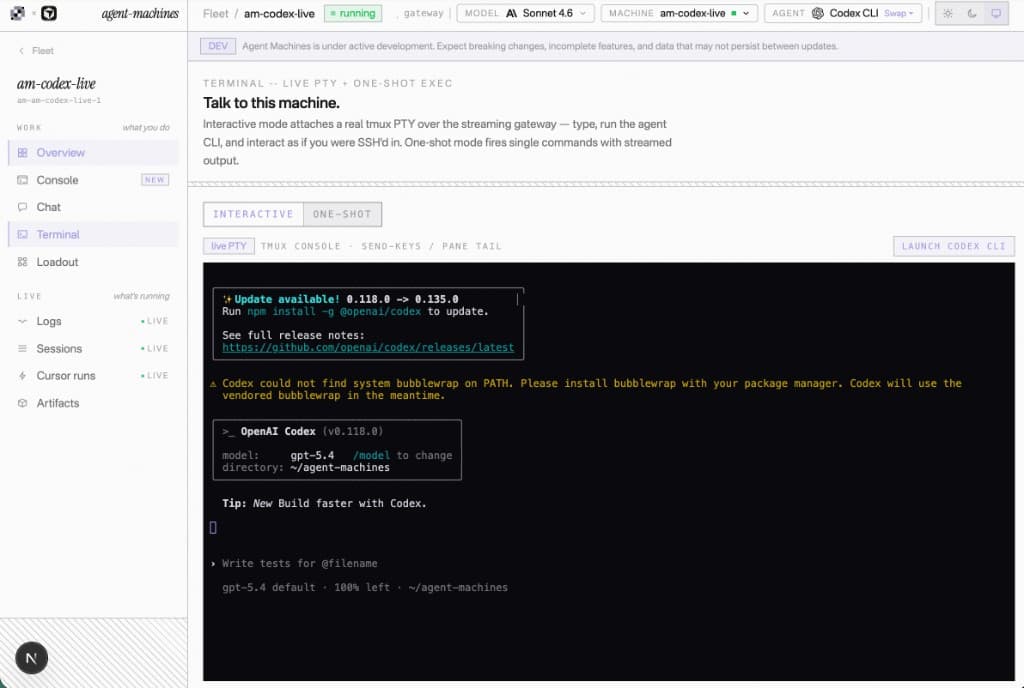
Codex CLI

WORKER CONTRACT

Runtime choice is saved on the worker.

The control plane stores agent, model, provider, sandbox, env, loadout, and persistence together. Switching agents changes the runtime, not the machine record.

active
Codex CLI
mode
task-driven
Hermes
autonomous

memory . cron . sessions . MCP-native

runhermes
commandhermes gateway
providers6 options
OpenClaw
autonomous

computer use . browser . shell . vision

runopenclaw
commandopenclaw gateway run
providers6 options
Claude Code
task-driven

edit repos . run shell . SDK . headless

runclaude
commandclaude -p "task description"
providers2 options
Codex CLI
task-driven

ship tasks . sandbox . JSONL . CI

runcodex
commandcodex exec "task description"
providers2 options
machine
persistent state
model
per-worker path
env
named profile

FAQ

Common questions about Agent Machines.

01

Can I run multiple agents for different jobs?

Yes. Provision specialist machines from opinionated presets: Hermes for memory and scheduled work, OpenClaw for browser work, Claude Code or Codex for coding tasks. Each preset bundles runtime, model path, memory, and loadout. One dashboard supervises activity, chat, cron, logs, usage, and artifacts.
02

What is Agent Machines?

Agent Machines is the product layer above sandboxes: a control plane that provisions a persistent agent worker as one unit — runtime, model path, skills, MCP, integrations, cron, observation, and fleet management — on the machine provider you choose. Pick Hermes, OpenClaw, Claude Code, or Codex, then pick E2B, Sprites.dev, Dedalus Machines, or Vercel Sandbox. Provision specialist workers from opinionated presets (Hermes, OpenClaw, Claude Code, Codex). Each preset is runtime + model path + memory bundle + loadout, visible from one fleet dashboard. The dashboard supervises the fleet. The long-term control surface is dashboard for humans, MCP/CLI for agent-to-agent orchestration.
03

How is this different from a regular chatbot?

A regular chatbot mostly returns messages. Agent Machines gives the agent a machine record, runtime root, terminal, filesystem, logs, usage, cron schedules, sessions, artifacts, and installable tools. State lives with the worker instead of disappearing after one request.
04

Which agents can I run?

Hermes, OpenClaw, Claude Code, and Codex are supported. Hermes is the default memory, cron, sessions, and MCP-native runtime. OpenClaw is the computer-use runtime. Claude Code and Codex are task-driven CLIs. All persist state under ~/.agent-machines/.
05

Which providers can host the machine?

E2B Sandbox, Sprites.dev, Dedalus Machines, and Vercel Sandbox are live provider implementations. Each plugs into the same MachineProvider abstraction for provision, state, lifecycle, command streaming where available, and public URLs where supported.
06

How is this different from a sandbox like E2B or Daytona?

Those are machine substrates. Agent Machines is the product layer above them: pick E2B, Sprites.dev, Vercel Sandbox, or Dedalus and get runtime install, loadout, gateway, cron, logs, usage, artifacts, and the browser console in one worker. Provider-specific features like sleep, snapshots, and public URLs are surfaced when the selected lane supports them.
07

How do I get my own machine today?

Sign in with Clerk, add provider credentials in /dashboard/setup, pick the agent, provider, spec, and model, then provision the machine record. The browser flow creates the provider machine and stores it in your fleet; the reliable agent bootstrap path is still the matching root CLI deploy command until browser-driven bootstrap lands.
08

What tools and skills come pre-installed?

The harness ships 161 SKILL.md files, 27 ranked service lanes (MCP → CLI → skills per vendor), 39 MCP catalog entries (2 core + 32 bundled + 4 IDE), 24+ closed-loop CLIs, and 9–23 agent-native tools depending on runtime (Hermes, OpenClaw, Claude Code, Codex). The loadout registry — not static marketing copy — is the source of truth.
09

Is Cursor required?

No. Cursor is optional delegation for code edits through cursor-bridge and @cursor/sdk. Without CURSOR_API_KEY, the rest of the machine still runs: chat, files, browser automation, closed-loop tools, skills, cron, memory, dashboard polling, artifacts, and provider lifecycle controls.
10

What is ~/.agent-machines?

~/.agent-machines is the unified runtime root for Agent Machines. It holds all agent state -- skills, crons, sessions, logs, MEMORY.md, USER.md, config, chats, and artifacts. The repo checkout at /home/machine/agent-machines is used by reload-from-git.sh to sync knowledge from GitHub.
11

What inference providers are supported?

Models can use any OpenAI-compatible /v1 endpoint. The CLI defaults to a vendor-agnostic inference URL; override with DEDALUS_CHAT_BASE_URL or configure model.base_url on the machine. The dashboard stores a model slug per machine.
12

What happens when a machine sleeps?

On supported providers, sleep pauses compute while preserving the persistent volume. The next wake resumes from disk: app artifacts, agent runtime state, skills, cron schedules, sessions, and the venv remain available.
13

Where does my data live?

Provider credentials and gateway bearers live in Clerk private metadata. Machine state lives on the provider machine under /home/machine, with all agent runtime data and app state under ~/.agent-machines. The public client only sees redacted provider and machine status.